Group Grid Tool - Default Page
This page specifies the default setting for any column properties that are unspecified.
|
Group Grid Tool - Default Page |
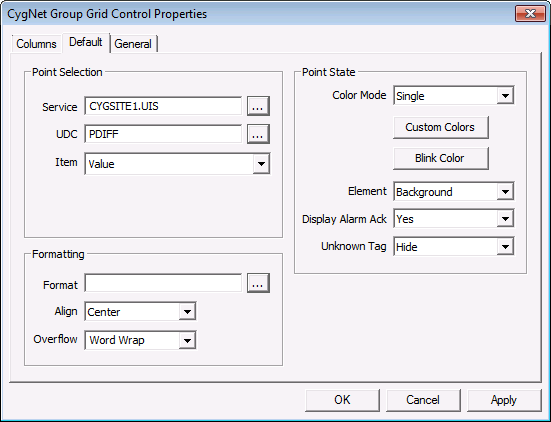
Point Selection
| Property | Description |
|---|---|
|
Site Service |
Specifies the default site service for the column. If this property is left blank, the grid will inherit TheView’s [SiteService] property. |
|
UDC |
Specifies the default UDC for the column. This property is typically left blank and is defined on a per column basis. |
|
Item |
Specifies the default item to be displayed in each cell in the column. The default is Value. Any point configuration property, CVS record property, or facility attribute can be used. This property is typically left as Value and changed on a per column basis as needed. |
Formatting
| Property | Description |
|---|---|
|
Format |
Specifies the display format of the data. This property is typically left blank and defined on a per column basis as needed. See Properties for more information. |
|
Align |
Specifies the text alignment. Default is Left. Other options are Right and Center. |
|
Overflow |
Specifies the behavior of text if the text is too wide for the column. Options are WordWrap and Ellipsis. |
Point State
| Property | Description |
|---|---|
|
Color Mode |
Specifies the point state color mode. Options include:
|
|
Custom Colors |
Specifies custom colors for alarms for the cells. See Customizing Point State Colors for more information. |
|
Blink Color |
Specifies the color that alternates with the alarm color when an unacknowledged alarm exists. Default is automatic. Leave blank to use the grid default. Note: Alarm blinking is available only for points created using the CygNet Enhanced Point Scheme (Point Scheme number 1 - 15). The blinking feature is not available for points created using the default CygNet Standard Point Scheme (Point Scheme number 0). |
|
Element |
Specifies if the alarm state is shown in the Foreground, Background, or not at all (None). |
|
Display Ack State |
Specifies if the tool blinks when an unacknowledged alarm exists. |
|
Unknown Tag |
Specifies how you want to handle tags that are unknown. Options are Hide or None. |


